C. M. Amos Printing Co.
Since 1945
Since 1945
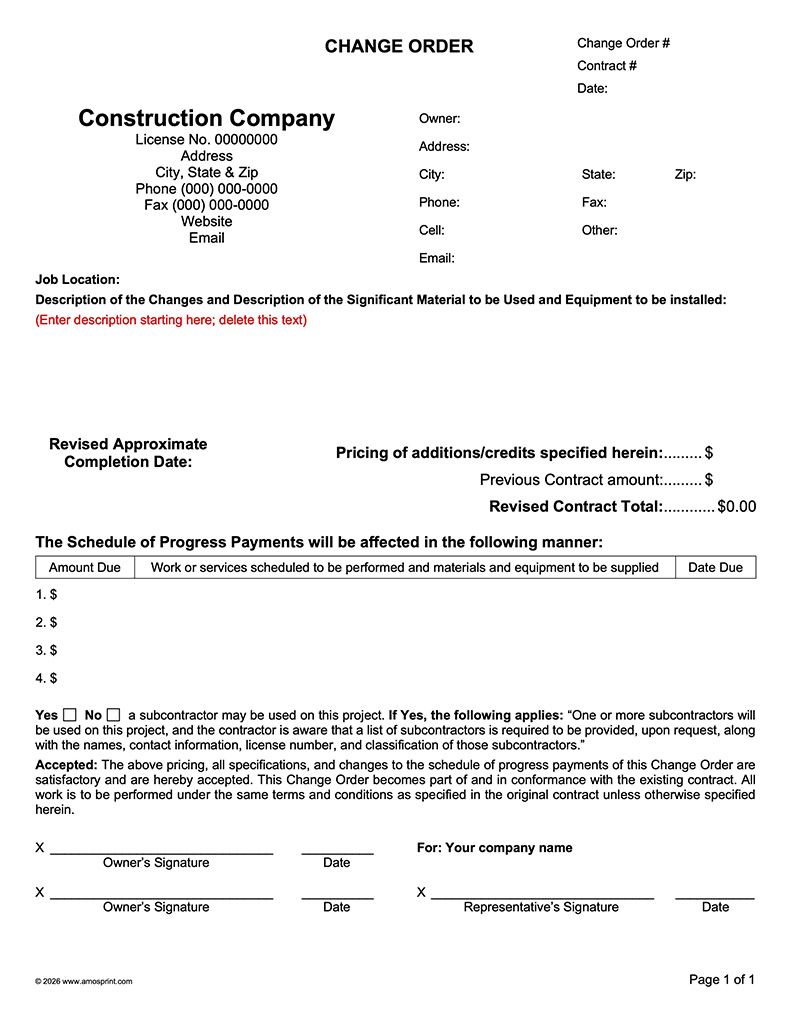
Ready-to-Use PDF & Word Change Orders
Spanish Forms Now Available!
Completely unpersonalized; you add the company info and details into the form. Please note: The text of these forms cannot be edited, only the text in the input areas can be edited. A logo cannot be added to these forms.
PDF Change Orders

Click to enlarge
Click below to download a fully functional sample of your choice:
Complies with the California State License Board (CSLB) requirements. Click here to review detailed 2026 requirements.
Please note: Review the brief 2026 Contract Changes taking effect January 1, 2026.
Designed to be used with Adobe Acrobat Reader and can be filled in on screen, printed and saved with unique names in PDF format. If changes are needed in the contract, simply open the file, make changes, print the changed pages and save again. You can conveniently copy text from Word into the form.
Please note: The text of the form cannot be edited, only the text in the input areas can be edited. A logo cannot be added to these forms.
Pricing includes the following pages:
- Page 1: Change Order.
- Pages 2-4: Specification pages.
Ready-to-Use PDF Change Order with Payments
Ready-to-Use PDF Change Order with Contract No, Change Order No, & Payments
Word Change Orders
Click to enlarge
Click below to download a fully functional sample of your choice:
Complies with the California State License Board (CSLB) requirements. Click here to review detailed 2026 requirements.
Please note: Review the brief 2026 Contract Changes taking effect January 1, 2026.
Designed from the ground up with Word and can be filled in on screen and saved in a separate file. Print or save in PDF format to send to your customer. If changes are needed in the contract, simply open the file, make changes, and save.
Please note: The text of the form cannot be edited, only the text in the input areas can be edited. A logo cannot be added to these forms.
Requires Word 2007 or newer; may work with earlier versions; experience with Word very helpful.
Ready-to-Use form features:
- Two formats to choose from.
- Unpersonalized; heading can be changed any time.
- Form areas locked so accidental changes cannot happen.
- Description of Changes area completely unlocked to allow full use of Word's editing and formatting capabilities.
- Description area can be a long as required.
Ready-to-Use Word Change Order with Payments
Ready-to-Use Word Change Order with Payments, Change Order No, & Contract No
To Order:
- Click Add To Cart for the form you want.
- When you've added all the forms you want to the cart then click Checkout Now in the cart overlay to complete purchase.
- Contract will be delivered via download.
- Payments: We are using Paypal to process our payments. You do not need a Paypal account to purchase from us. Choose "Don't have a Paypal account" when you get to the payment page.